
e-motion® M25
Alber GmbHMedical
2.810.00 Reviews
- Version
- 2.7.0.3
- Installs
- 10.00K
- Age Rating
- Everyone
Screenshots
Our Review of e-motion® M25
 Analysis by Appyee
I tend to think of the e-motion® M25 app less as something every person in a household should use and more as a companion for the person who relies on those wheels. That distinction matters when a mobility device is shared, maintained, or discussed by several people. The app can make day-to-day information easier to check, but it should not be mistaken for a family-management tool or a replacement for the rider’s own decisions. My overall view is that it is most useful when its role is kept focused: helping a rider understand and adjust their e-motion setup.
One mobility setup, several people involved
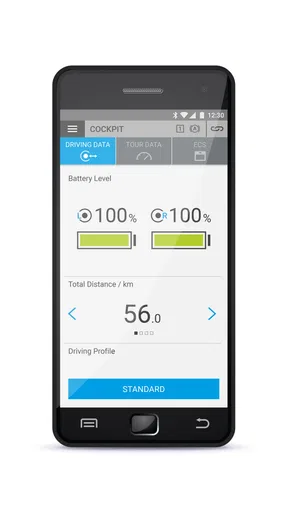
Picture a household where one person uses the wheels every day, while a partner or relative sometimes helps with planning a trip or getting ready to leave. A battery check before an outing can make that conversation more practical: the rider can look at the status and decide whether charging should happen before going out. A trip computer can also give the rider a record of a journey to refer to later. These are small, specific conveniences, not a shared household dashboard.
I would keep the rider at the center of any shared use. A helper can support with a phone when invited, but the person using the mobility equipment should remain the one who chooses settings and decides what information is useful. That is especially important when adjustments affect how the wheels respond. Having a profile option does not, by itself, mean there are separate permissions, caregiver controls, or a way to prevent someone else from changing a setting.
Keep phone access and equipment access separate
Before pairing a phone, I would agree on whose device is being used and who is expected to manage it. If a family member pairs the wheels to their own phone, that may be convenient in the moment, but it can create confusion later if the rider expects to check the app independently. For a shared phone, it is worth making sure the person using it can reach the relevant screens without having to rely on someone else’s account or routine.
I would also treat Bluetooth pairing as a practical setup step rather than assume it settles every household question. The useful test is simple: can the rider open the app, connect when needed, and understand the information without a helper translating it? If not, a short practice session at home is better than trying to learn the controls while preparing to leave. For a household with several phones, decide which phone is the everyday one instead of repeatedly switching devices just because each person happens to be nearby.
Coordinate changes instead of guessing
When more than one person helps with the equipment, even a small adjustment can prompt questions later: who changed it, and was that change intended for a particular outing? I would avoid making a series of adjustments on behalf of the rider without discussing them first. If the rider does choose to try a different driving characteristic, make one change at a time and notice how it feels in a familiar, low-pressure setting before relying on it elsewhere.
The trip information can be useful for reflection, but I would not turn it into a scorecard for another person. A distance or duration can help the rider compare outings or talk through a route; it does not explain why a trip took a certain amount of time or whether the journey felt comfortable. The most helpful coordination is usually a clear conversation about what the rider wants to check, rather than a family member interpreting the app’s figures on their behalf.
Age, confidence, and trust
The app is marked for everyone, which describes its content rating rather than proving that every rider will find it equally easy to use. A younger user, an older adult, or someone who is not comfortable with smartphone controls may still want another person nearby during initial setup. I would offer help without taking over: let the rider tap through the screens, explain unfamiliar terms, and ask before touching a setting.
There is also a trust boundary around personal mobility information. The practical approach is to share access only with people who genuinely help the rider, and to avoid assuming that a relative should automatically manage the app. If a household needs formal caregiver permissions or a detailed record of who changed a setting, this app should not be treated as providing those arrangements. A separate, agreed household routine may be necessary.
Who benefits, and when a simpler option wins
I see the strongest fit for an e-motion M25 rider who wants quick access to device-related information and is comfortable carrying a phone. It may also suit a rider who likes reviewing journeys or adjusting driving characteristics personally. Someone who only needs occasional support from a helper could still find it worthwhile, provided they establish a straightforward pairing routine and keep control of decisions.
It is less compelling for someone who does not use the e-motion M25 wheels, wants a general mobility diary, or expects an app to coordinate several household members. A paper note, a calendar reminder to charge, or a direct conversation may be simpler for those needs. Compared with a generic health or activity tracker, this app’s purpose is narrower and tied to the specific wheel system; that focus is valuable for relevant users but does not make it a substitute for broader health tracking or route-planning tools.
First Impressions: Getting Started with the App
Let’s start with the basics. Downloading the app was a piece of cake. Available on both Android and iOS, it’s super easy to find in the app store. The installation was quick, and the first thing I noticed was the sleek and user-friendly interface. It’s got this modern vibe that makes navigation feel intuitive.
Once inside, the app prompts you to pair it with your e-motion® M25 wheels. The Bluetooth connection was seamless, and I didn’t experience any hiccups, which is always a plus in my book. The app also gives you a quick tutorial to get you up to speed, which is great if you’re not too tech-savvy.
Features That Make a Difference
Now, onto the fun part—the features. This app is packed with tools designed to enhance your mobility. One of my favorites is the battery status monitor. It displays real-time battery life, which is a lifesaver when you’re planning your day out. No more guessing if you need to charge before heading out!
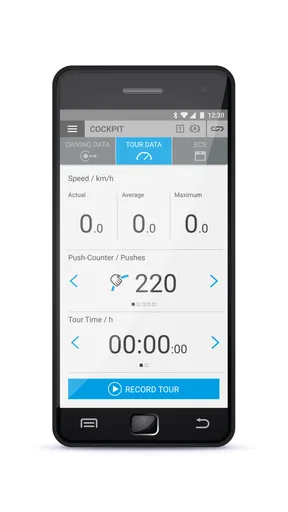
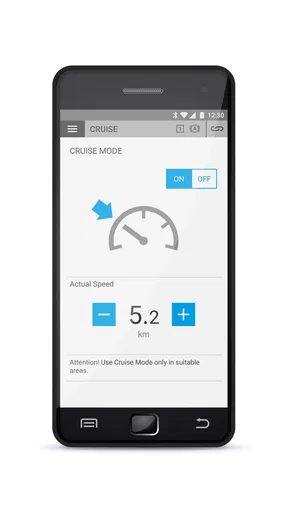
The app also includes a speedometer. This is not just a cool add-on; it’s practical. It helps you maintain a consistent speed, which is crucial for safety and energy efficiency. I found myself checking it frequently, especially when on long stretches.
Another nifty feature is the trip computer. It logs your journey details, such as distance traveled and time taken. It’s like having a personal mobility diary! I found this particularly useful for keeping track of my mobility goals. Plus, it’s nice to see how much ground I’ve covered.
Customization and User Experience
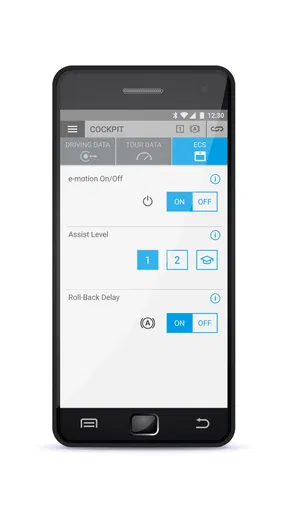
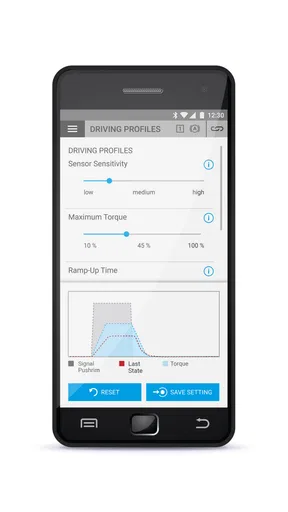
Customization options? Check! The app allows you to tailor settings to your preferences. You can adjust the driving characteristics and even set up profiles for different users. This level of personalization makes the app feel like it’s truly yours, adapting to your unique mobility needs.
The user experience overall is smooth. The app is responsive, and I didn’t encounter any lags or crashes during my use. The design is clean, making navigation straightforward even for those who aren’t exactly tech enthusiasts.
One practical way to approach those options is to treat a profile as a starting point, not a guarantee that the same setting will suit every route or day. If several people use the equipment, agree on who can make changes and avoid switching profiles casually. A rider can then build familiarity with a chosen setup instead of having to work out what changed just before heading out.
For a first session, I would check the battery status while stationary, look through the speed display and trip computer, and only then explore customization. That order keeps basic orientation separate from experimenting with response settings. It also makes it easier to explain the app to a helper: first show what the rider uses to prepare, then discuss optional adjustments only if the rider wants them.
Real-Life Application: How It Fits into Daily Life
So how does the e-motion® M25 app fit into everyday life? Pretty seamlessly, I must say. It’s like having a co-pilot that’s always ready to assist. Whether you're commuting to work or rolling through the park, the app supports you every step—or wheel—of the way.
I particularly appreciated the app’s ability to adapt to different environments. Whether on smooth pavements or rougher terrains, the app keeps everything steady and reliable. This adaptability is crucial for anyone relying on mobility devices daily.
A realistic routine might be checking the battery before a planned appointment, using the speed display during a familiar stretch, then glancing at the trip record afterward if the rider wants to remember how long the outing took. The useful detail is not that every screen needs attention on every trip; it is that each one has a different moment when it can help. I would not encourage looking at the phone while moving. Check information before setting off or once safely stopped, and let attention stay on the route.
That routine also helps answer whether the app is worth keeping open in everyday life. If the rider mostly wants a quick battery check and rarely changes settings, it can still serve a clear purpose without becoming another task to manage. If the phone itself is a distraction or the rider prefers not to carry it, the wheels remain the priority and the app may be better reserved for occasional setup or review.
What to know before relying on it
The app is free to download, though its store information also lists in-app purchases at $284.99 per item. I would check the purchase screen carefully before confirming anything, particularly if a family member helps with setup or uses a shared phone. Do not assume that every useful function requires a purchase, or that a listed item is necessary for ordinary use; decide based on what the app actually presents to you and what the rider needs.
Alber GmbH develops this medical app. It was released on January 8, 2021, and its current version is 2.7.0.3, with Android 7.0 as the minimum operating-system requirement. Its content rating is Everyone. Those details make it straightforward to assess basic device compatibility, but I would still install it on the phone the rider intends to use and confirm the pairing before depending on it for an important outing.
Its average rating is 2.8 from 172 ratings, with 10 written reviews, and it has over 10,000 installs. I read that as a reason to approach it with realistic expectations rather than as a verdict on one person’s experience. The best test is whether it pairs reliably with the rider’s equipment, presents the information they actually use, and fits their phone habits. A low-friction trial at home can answer those practical questions before the app becomes part of a daily routine.
If pairing is troublesome, I would first check that Bluetooth is enabled and that the rider is following the app’s connection flow, then try again in a calm setting rather than repeatedly attempting it during departure. If the phone or wheel connection remains unreliable, the app should not be the only way the household prepares for a trip. Keep the rider’s usual charging and travel routine in place while deciding whether the digital companion is dependable enough for them.
Final Thoughts: Would I Recommend It?
After exploring all that the e-motion® M25 app has to offer, I have to say I’m genuinely impressed. It’s a solid tool for anyone using the e-motion® M25 wheels, enhancing not just the mobility experience but also providing peace of mind.
The combination of real-time data, customization options, and ease of use make it a must-have for users. It’s clear that a lot of thought has gone into ensuring the app meets the needs of its users, and it hits the mark beautifully.
In a nutshell, if you’re using the e-motion® M25 wheels, this app is worth every byte of storage space. It’s like having a trusted companion that’s always got your back. So, give it a go and see how it transforms your mobility experience!
Verdict
Strengths of e-motion® M25
- Easy to install and pair with devices.
- Lightweight design enhances mobility.
- Durable build for long-term use.
- User-friendly interface for all ages.
- Customizable settings for personalized use.
Limitations of e-motion® M25
- Requires frequent charging for heavy use.
- Limited compatibility with older devices.
- Higher price point compared to competitors.
- Occasional connectivity issues noted.
- App updates can be slow to release.
Similar Picks in This Category
View All
WebMD: Symptom Checker
WebMD, LLC4.1

Microphone Amplifier
DOSA Apps4.2

Anatomy Learning - 3D Anatomy
3D Medical OU4.5

Period Tracker and Calendar
SimpleInnovation4.9

GoodRx: Prescription Coupons
GoodRx4.8

CVS Health
CVS Pharmacy4.5
Frequently Asked Questions
What is e-motion® M25 and how does it work?
The e-motion® M25 is an innovative power assist system for manual wheelchairs, designed to make mobility easier for users. It works by attaching powerful, lightweight motors to the wheelchair's wheels, providing additional propulsion with minimal effort. This setup allows users to navigate various terrains with ease, offering more independence and comfort.
Is the e-motion® M25 compatible with all manual wheelchairs?
The e-motion® M25 is compatible with most manual wheelchairs, but it is essential to confirm compatibility with your specific model. The system is designed to fit a variety of wheelchair types, but checking with the manufacturer or your retailer can ensure a proper fit and optimal performance.
How long does the battery last on a full charge?
A fully charged e-motion® M25 battery can last up to 25 kilometers, depending on factors like terrain, user weight, and speed setting. The battery is designed for long-lasting performance and can be recharged using a standard outlet, ensuring it’s ready for daily use.
Can I control the speed and settings of the e-motion® M25?
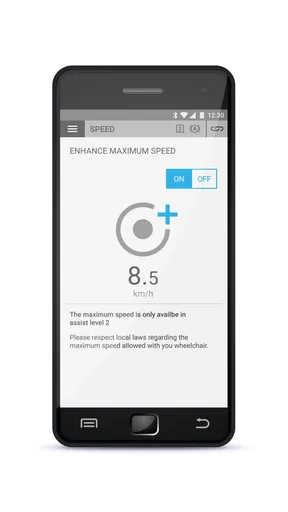
Yes, the e-motion® M25 offers customizable speed settings that users can adjust according to their needs. The control unit allows users to select from different speed levels, providing flexibility and control over their mobility experience. Adjustments can be made easily, ensuring a personalized ride.
What kind of maintenance does the e-motion® M25 require?
The e-motion® M25 requires minimal maintenance to keep it in optimal condition. Regular checks on the battery status, tire pressure, and motor attachments are recommended. Additionally, keeping the unit clean and ensuring all connections are secure will help maintain its performance. Manufacturer guidelines should be followed for specific maintenance tasks.
